
Required permissions
Prosperity asks for a small set of Discord permissions. Each one maps directly to a feature. If you remove one, the matching feature stops working.
Permissions Prosperity uses
| Permission | Why it is needed |
|---|---|
| View Channels | To see the channels where members are active, so messages can earn XP. |
| Send Messages | To post level-up messages and command responses. |
| Embed Links | Level-up messages and several command replies are sent as embeds. |
| Manage Roles | To grant and remove level roles when members level up. |
Prosperity does not need message-content access to award XP. It reacts to the fact that a message was sent, not to what the message says. See Intents and data for the detail.
Role position
Discord only lets a bot manage roles that sit below its own highest role. For level roles to work:
- Open Server Settings, then Roles.
- Drag the Prosperity role above every role you use as a level role.
If level roles are not being granted, this is almost always the cause.
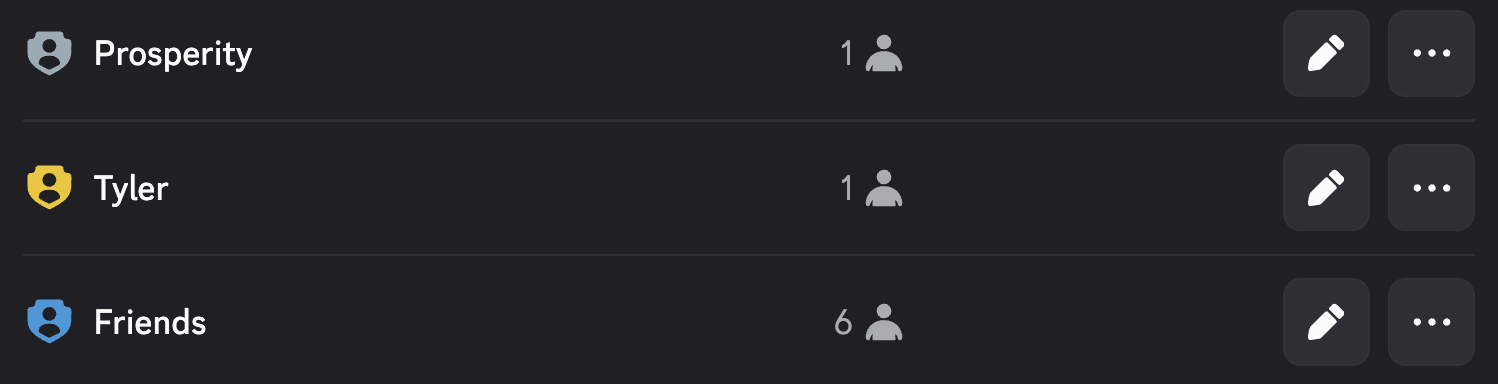
Here the Prosperity role sits above Tyler and Friends, so it can grant either of them as a level role. A role positioned above Prosperity cannot be assigned by the bot.
Command-level permissions
Members do not need any of the above to run commands. The permissions here are for the bot. Which members can run which commands is controlled separately:
- Admin commands default to requiring Manage Server or Administrator, and Discord hides them from members who lack the permission.
- You can further restrict any command per channel or per role under Server Settings, then Integrations, then Prosperity.
See the command reference for the permission each command requires.